R_volution PlayerPro 8K TV Review: High-End Media Box
I tested the R_volution PlayerPro 8K TV with 4K remuxes and streaming apps. Here is my honest verdict on whether this €1,699 media player is worth the money.
If you play high-bitrate UHD remux files on a massive projection screen, commercial streaming services like Netflix look soft and washed out by comparison. The R_volution PlayerPro 8K TV is designed to solve that compromise by packing dedicated reference-grade local playback and certified Android TV streaming into a single, rack-mountable box. It delivers exceptional picture stability and audio precision, but at this price, it also comes with a few design choices that frustrated me.
R_volution sent me this review unit without editorial conditions, and on June 5, 2026, it cost €1,699 (around $1,999) on the official R_volution store. That is serious money for a media player. You can buy ten standard streaming sticks for that amount, so it needs to deliver something special.
Hardware build and AV connections
The moment you lift this box out of the foam packaging, you realize it is not a standard streaming puck. It weighs roughly 10 kilograms, measures 43 by 11 by 34 centimeters, and feels like high-end audiophile equipment. Inside the chassis, you get a toroidal transformer, a linear power supply, and TCXO clocks to keep jitter to a minimum.
As I said in the video, "No, this thing is built like it belongs in a real home theater rack. It is heavy, it is overbuilt."
Behind a drop-down door on the brushed front faceplate, you will find dual 3.5-inch SATA hard drive bays. They are hot-swappable, letting you slip in massive storage drives directly into the unit without running an external USB hub or a separate enclosure.
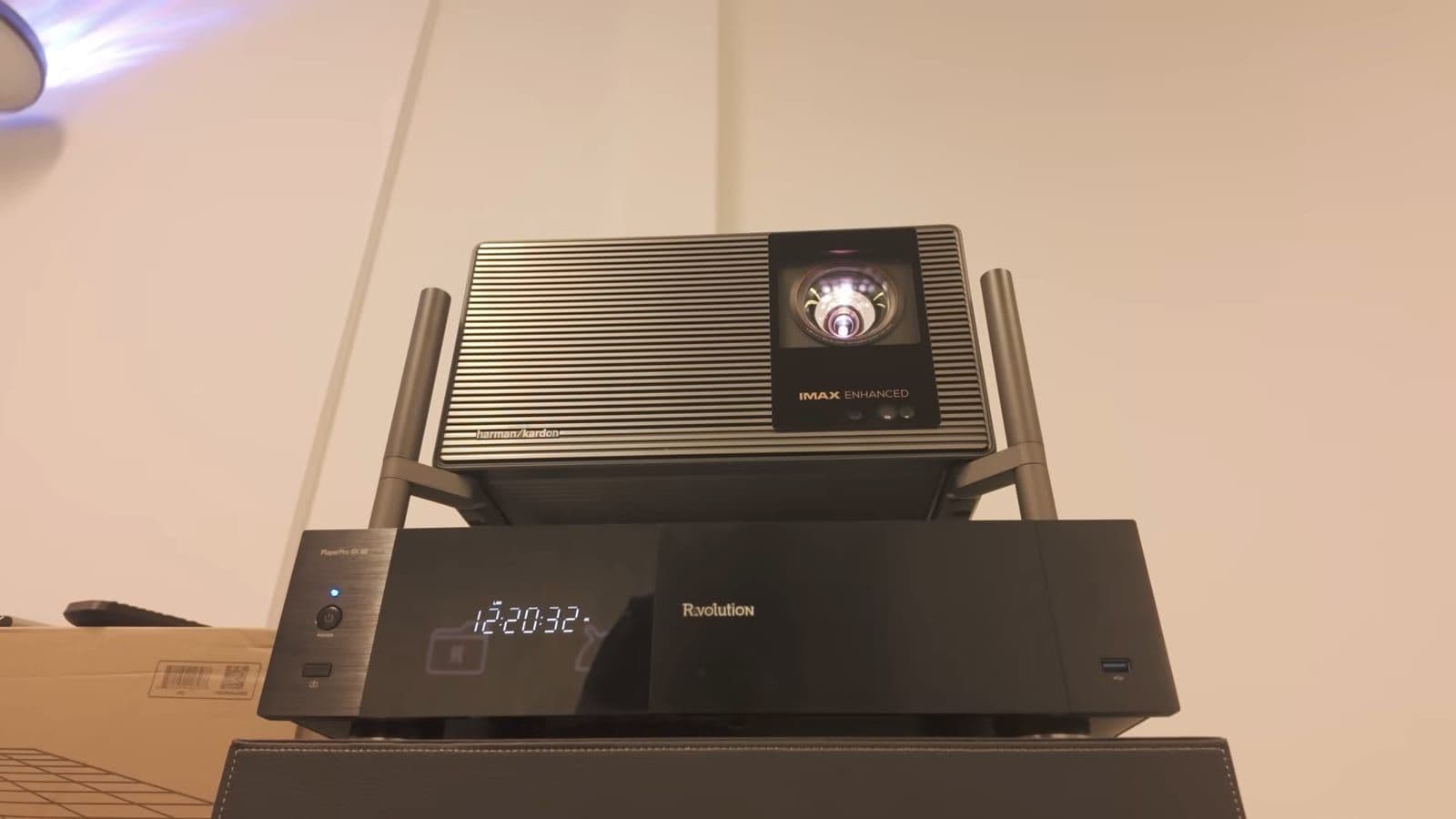
The rear panel reveals real thought for home theater installers. The labels for the HDMI connections are printed upside down above the ports. When you lean over your AV cabinet to plug in a cable blindly from above, you can actually read what you are doing. "Those are exactly the kind of details that tell me this thing is made for real world AV setups, not just spec sheet flexing."
Here is what you get across the back:
- 1x HDMI 2.1a main output (up to 8K at 60 fps or 4K at 120 fps)
- 1x HDMI audio-only output
- 2x HDMI inputs
- Optical, coaxial, and analog RCA stereo audio outputs
- Dedicated low-noise USB Audio DAC port
- Gigabit Ethernet port (1000 Mbps)
- Wi-Fi with two external antenna mounts and IR extender port
Having a dedicated audio HDMI port is a massive win if you own a high-end sound system. It lets you send uncompressed audio to an older AV receiver while feeding an 8K or 4K HDR feed straight to your projector or TV.
My biggest hardware frustration is the networking port. Putting standard 1 Gbps Gigabit Ethernet on a €1,699 player in 2026 is stingy. When you are transferring 80 GB remux files across your local network to the internal drives, 2.5 Gbps or 5 Gbps would have saved a lot of waiting time.
Two operating systems inside one chassis
Most enthusiast players make you choose your poison. If you pick a Dune HD or a Zidoo, you get brilliant local playback for MKVs and ISOs, but streaming services like Netflix run in low resolution without proper Widevine L1 licenses. If you buy an Apple TV 4K or an NVIDIA Shield, streaming works well, but advanced audio passthrough and UHD Blu-ray menu handling fall short.
The PlayerPro 8K TV tries to solve this by running two distinct hardware platforms in one case. There is a primary high-end processor handling the custom R_video interface, paired with a Google-certified Android TV module from Homatics.
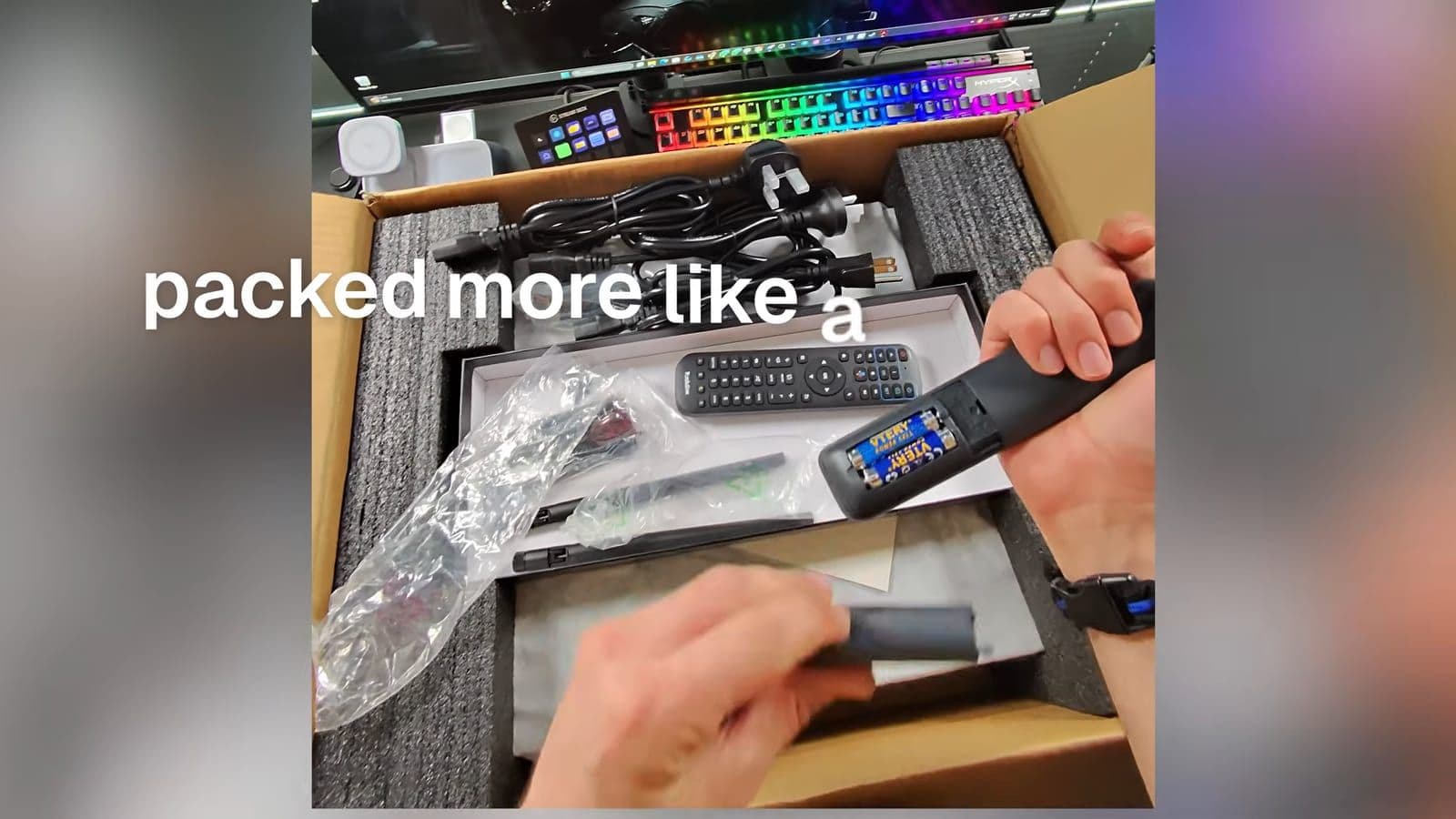
Because of that dual architecture, the unboxing experience is quirky. You get two remotes in the box. One is a standard Google-certified Homatics remote used exclusively for the initial Android TV setup, pairing, and voice search. The second remote is the larger R_volution controller for daily media navigation.
Switching between systems happens by pressing the Top Menu button on the remote. It works, and it gives you legitimate 4K Netflix, Prime Video, and Disney+ streaming without sideloaded workarounds. However, switching between two entirely different user interfaces does not feel unified. It feels like two separate devices sharing an internal HDMI switch and a power supply.
The main remote is also disappointing. For two thousand dollars, I expected a weighted aluminum remote with quiet, tactile switches. Instead, it is made of lightweight plastic, and the buttons require a stiff press.
Managing large movie libraries with R_video
The local interface runs on R_video, which scans your internal hard drives, attached USB storage, or SMB network shares on your NAS. The scraping engine pulls movie posters, backdrops, plot summaries, audio codecs, and full cast filmographies automatically.
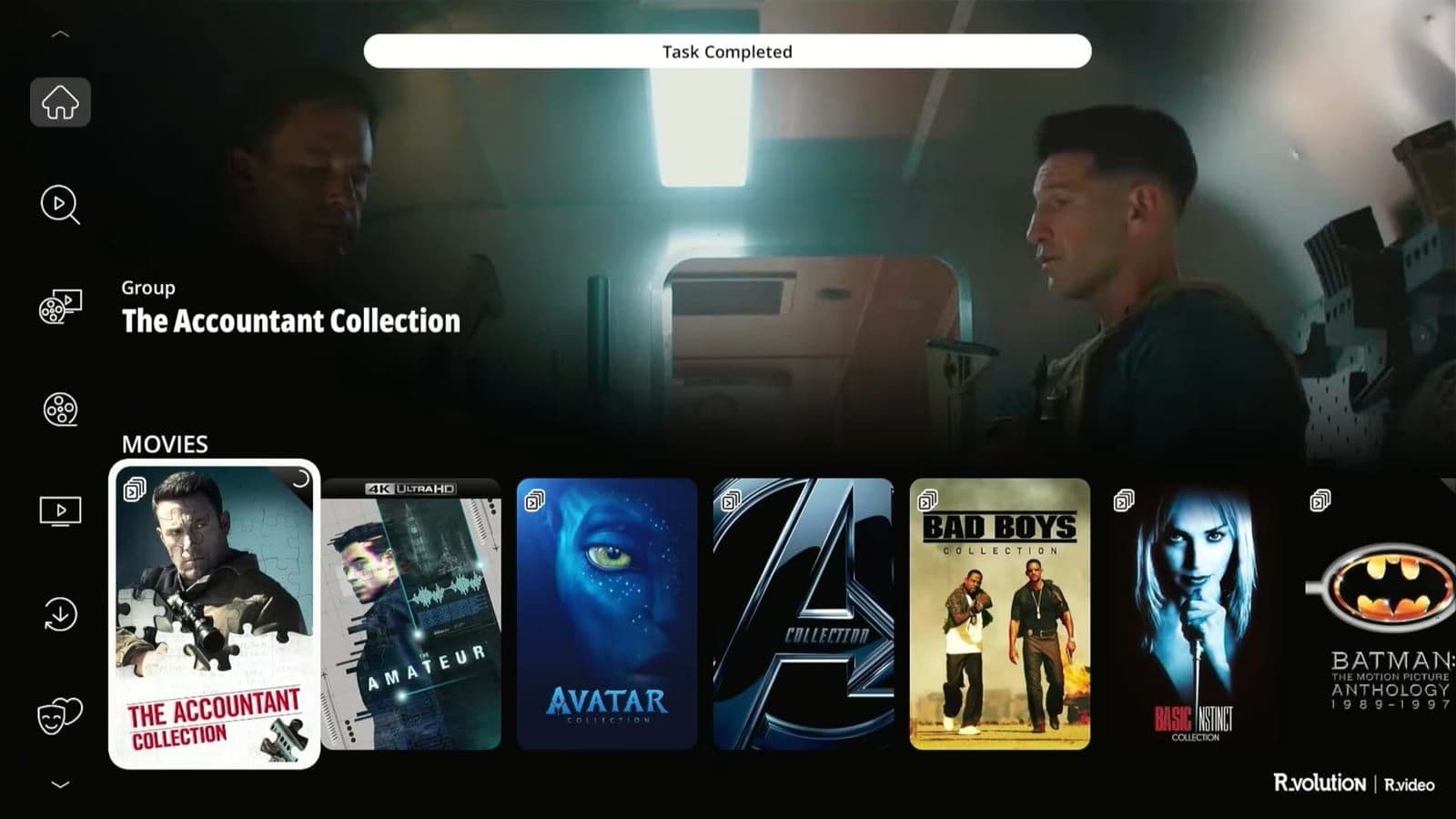
The poster wall looks clean, grouping movie sagas like Batman or The Accountant into collection folders so your library stays organized. If you like to customize your collection, you can install the R_video companion software on a Mac or PC. From your computer, you can swap out movie posters, change banners, or modify file titles, and the changes sync back to the player over your network.
Compared to running a standard Plex app on a streaming stick, the difference in presentation is clear. As I noted during my testing, "Yes, Plex is very good. This is different; it's a whole different level."
My only complaint here is navigation speed. Scrolling through large libraries and executing search queries feels a step behind the responsiveness of Zidoo's PosterWall. It is functional, but it lacks that instant, snappy feedback.
Advanced video settings and picture calibration
Where the PlayerPro 8K TV justifies its price tag is in the video settings menu. Most mainstream streamers give you a basic resolution toggle and an HDR switch. Here, you get granular control over the entire display pipeline.
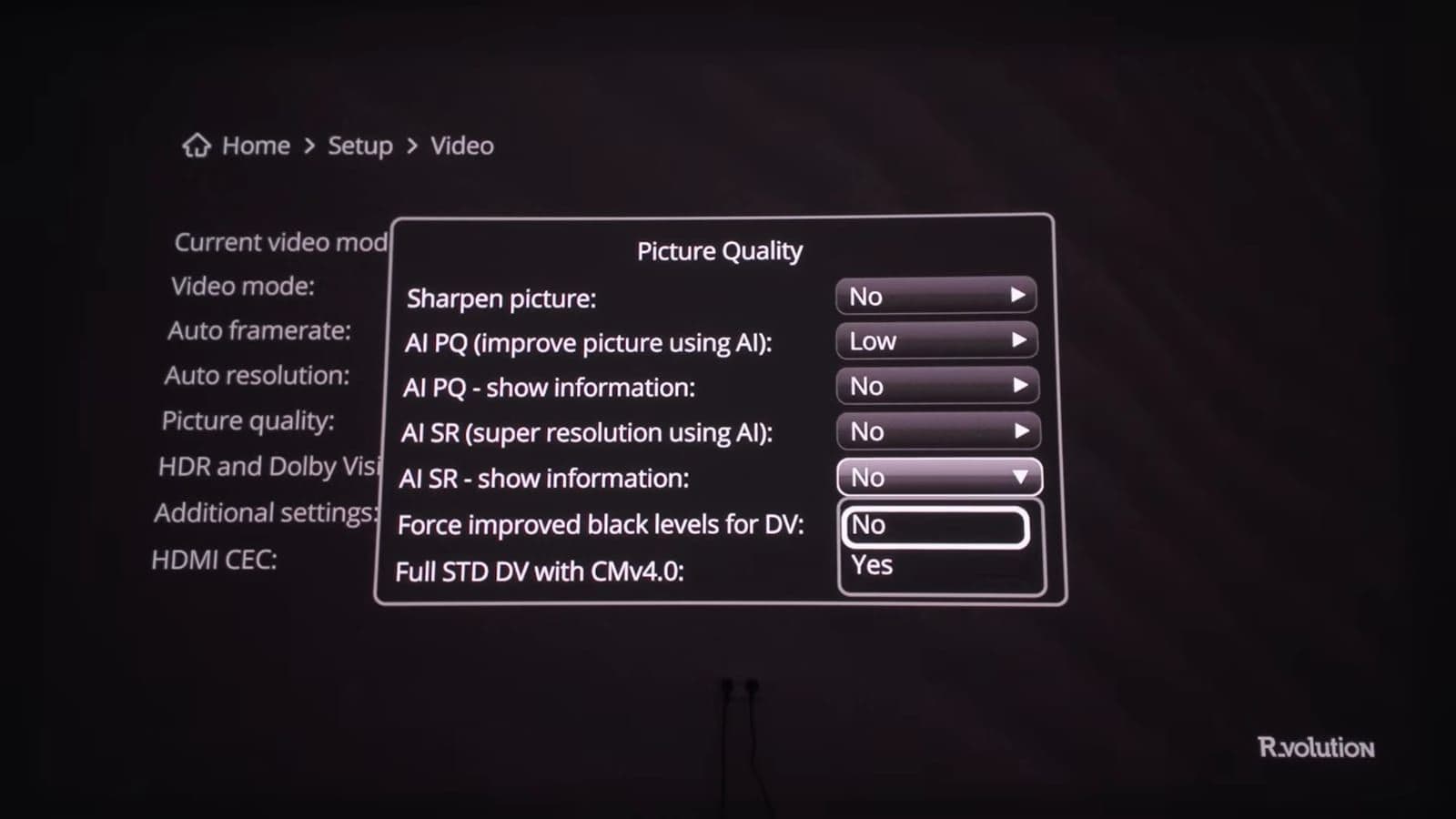
You can set explicit color spaces for every resolution and frame rate, toggle 10-bit or 12-bit YCbCr 4:4:4 or 4:2:2 output, and force specific black levels. It includes full STD Dolby Vision with CMV4.0 processing alongside standard LLDV (Low Latency Dolby Vision).
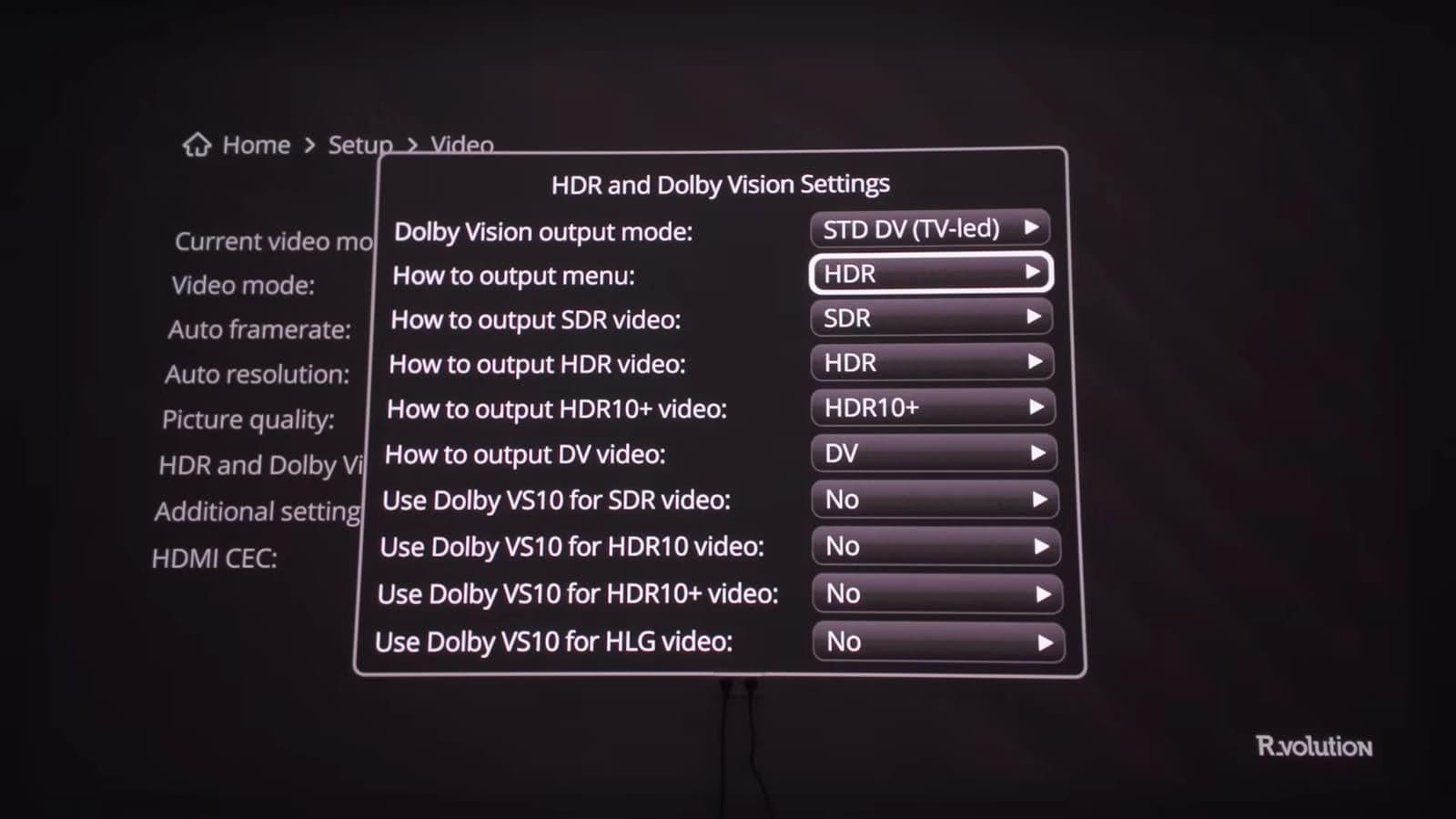
The player also integrates the Dolby VS10 processing engine. You can configure VS10 to process SDR, HDR10, and Dolby Vision content individually, which helps prevent highlight clipping when mapping HDR content onto a projector with limited brightness.
Picture quality, remux bitrates, and audio passthrough
I tested the player connected to my XGIMI Titan Noir Max projector, throwing an image onto a 200-inch screen. This is where compressed web streams fall apart and where the PlayerPro 8K TV shows its strength.
"The difference between watching a Netflix stream and watching a proper movie remux file is huge." A typical 4K stream from a subscription service runs at 15 to 25 Mbps, which works out to about 7 GB per hour of footage. A full 4K UHD Blu-ray remux or ISO file runs at 82 to 128 Mbps, pulling 66 GB to 100 GB for a single movie. As I said in the review, "It's four times smaller, so it comes from the details."
On a massive screen, that bitrate jump completely eliminates color banding in smoky skies and prevents macroblocking in dark shadows. Fine film grain stays sharp instead of smearing into digital noise. The internal linear power supply and stable clocks deliver rock-solid frame pacing. High-action scenes glide along smoothly with zero stutter.
Audio performance matches the picture quality. Routing uncompressed audio out of the secondary HDMI port into a surround processor worked without issues. The player bitstreams full Dolby Atmos (TrueHD), DTS:X, Auro-3D, and multichannel LPCM tracks. You also get a native sample rate switch delay setting, which stops older receivers from popping when switching between stereo music tracks and multichannel film soundtracks.
Who should buy the PlayerPro 8K TV and who should skip it
This is not a mainstream media box, and it is not trying to be.
Who should buy this:
- Home theater owners running high-end projectors or large OLED panels who want reference playback for their UHD Blu-ray rips, ISOs, and remux files.
- Enthusiasts with extensive local storage who want internal 3.5-inch hard drive bays without running loud external drive docks.
- Anyone who needs a secondary audio-only HDMI port to keep an older AV processor in their audio chain.
- Users who want all their physical disc rips and official 4K streaming apps running inside a single physical AV component.
Who should skip this:
- Casual viewers using a standard living room television who primarily watch YouTube, Netflix, and Disney+. A standard Apple TV or Chromecast gives you the exact same streaming quality for a fraction of the cost.
- Plex users who already have an NVIDIA Shield or Apple TV running happily and do not need local hard drive bays or ISO playback.
- Anyone on a budget. At €1,699, you are paying for niche AV engineering, linear transformers, and specialized clocks.
Frequently asked questions
How does the PlayerPro 8K TV compare to a Zidoo media player?
The Zidoo offers a snappier movie wall interface and a more premium remote control at a lower price point. However, the PlayerPro 8K TV includes a Google-certified Android TV module in the same box, allowing official 4K streaming apps that Zidoo cannot match without DRM limitations.
Can the dual HDMI ports split video and audio simultaneously?
Yes. The primary HDMI 2.1a port sends full resolution video up to 8K straight to your television or projector, while the secondary HDMI port outputs an audio-only stream. This lets you enjoy lossless Dolby Atmos or DTS:X on older AV receivers that do not support modern HDMI video formats.
Does R_video require a paid subscription to scrape metadata?
No. The PlayerPro 8K TV includes an R_video token code in the box that activates your account. Once registered, the system automatically scrapes posters, cast details, and plot summaries from online databases without recurring monthly fees.
Is the Ethernet port fast enough for 4K UHD remux playback?
Yes, the 1 Gbps Gigabit port handles local playback of the heaviest 128 Mbps UHD Blu-ray files without buffering. The only drawback is that transferring multiple terabytes of movie files directly onto the internal drives over your local network takes longer than it would with a 2.5 Gbps connection.
Zino
Zino test gadgets voor zijn YouTube-kanaal ZinoNetic: robotstofzuigers, loopbanden, NAS-systemen, thuisbatterijen en meer. Een review schrijft hij pas als hij het apparaat zelf heeft gebruikt.